
Floor OS — one system, two operators
A contextual operating system UI for industrial machines that adapts to who’s using it — the operator on the floor and the manager at the desk.
Type
Fictional / Spec project
Tools
Figma, Claude
Status
Design only
Personas
Operator, Manager
Context
The interface should know who you are
Fictional project, inspired by playing Satisfactory. I wanted to design a full operating system UI for industrial machines, not just a dashboard. The goal was the architecture and the logic: a design system that adapts to who’s using it, not a complete set of pages and flows.
Most industrial software ignores the human standing in front of it. Floor OS started from a different premise: the interface should know who you are, where you are, and what you need right now.
Challenge
Information density vs. cognitive load
Industrial UI design sits at the intersection of two hard problems: information density and cognitive load.
The same product has to serve two people with opposite needs:
The manager
Works at a desk, has time to think, and needs the full picture: OEE across all lines, open incidents, production targets, shift reports. They can read small labels, navigate nested menus, and cross-reference data across panels.
The operator
An operator is standing 1-2 meters from the screen, in a loud environment, with their hands and attention partly on the machine. They need to know one thing immediately: is everything OK? If not, what exactly is wrong? They cannot afford choice overload (Hick's Law). They need large targets, fewer options, and high-contrast feedback.
The design challenge was to serve both without creating two separate products.


Operator view
Process
Design system: one language, multiple dialects
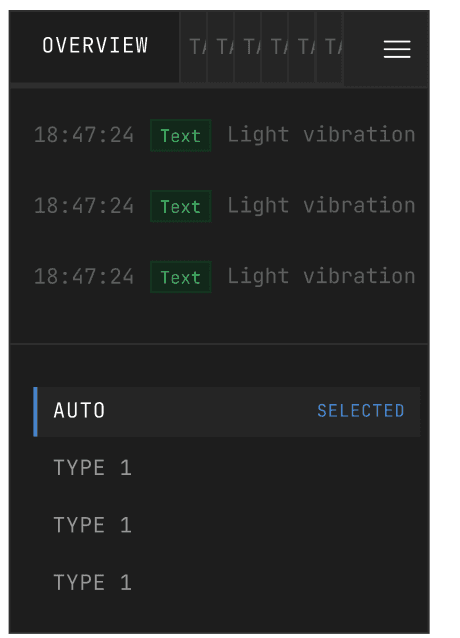
Atoms — include the low-level visual building blocks: process path indicators (wave and square variants, in blue / yellow / red / green, active / inactive), info bubbles (Warn / Error / Success / Info / Neutre), buttons (Default / Selected / Hover), and process state cards (Success / Error / Warn / Next / Actual).

Architecture diagram
Molecules are purpose-built data display units, each designed for a specific type of industrial information:
Datas Bar — horizontal resource bar (Electricity, Coolant, Lubrication, etc.) with 5 semantic states (Ok / Warning / Error / Info / Neutre) and two sizes (Grand / Petit) for different interface densities
Logs — chronological event rows, color-coded by severity
Process Infos Graph — real-time cycle graph with multiple overlapping signals
Process Cycle — horizontal timeline showing current production step
Programs Buttons — program selector (Selected / Normal states)
Process
Design system: one language, multiple dialects
Atoms — include the low-level visual building blocks: process path indicators (wave and square variants, in blue / yellow / red / green, active / inactive), info bubbles (Warn / Error / Success / Info / Neutre), buttons (Default / Selected / Hover), and process state cards (Success / Error / Warn / Next / Actual).


Decisions
The Slot system — composition over duplication
Instead of one card per data type, I used Figma’s Slot feature to build a fully composable card system. Every panel is a Background+Border+Component shell (220px / 1024px) containing a slot. Inside lives a Spacer that adapts to the molecule — vertical for Logs, horizontal for graphs. The same card hosts any molecule, in any context, without duplication.

Architecture diagram

Token architecture
Design tokens
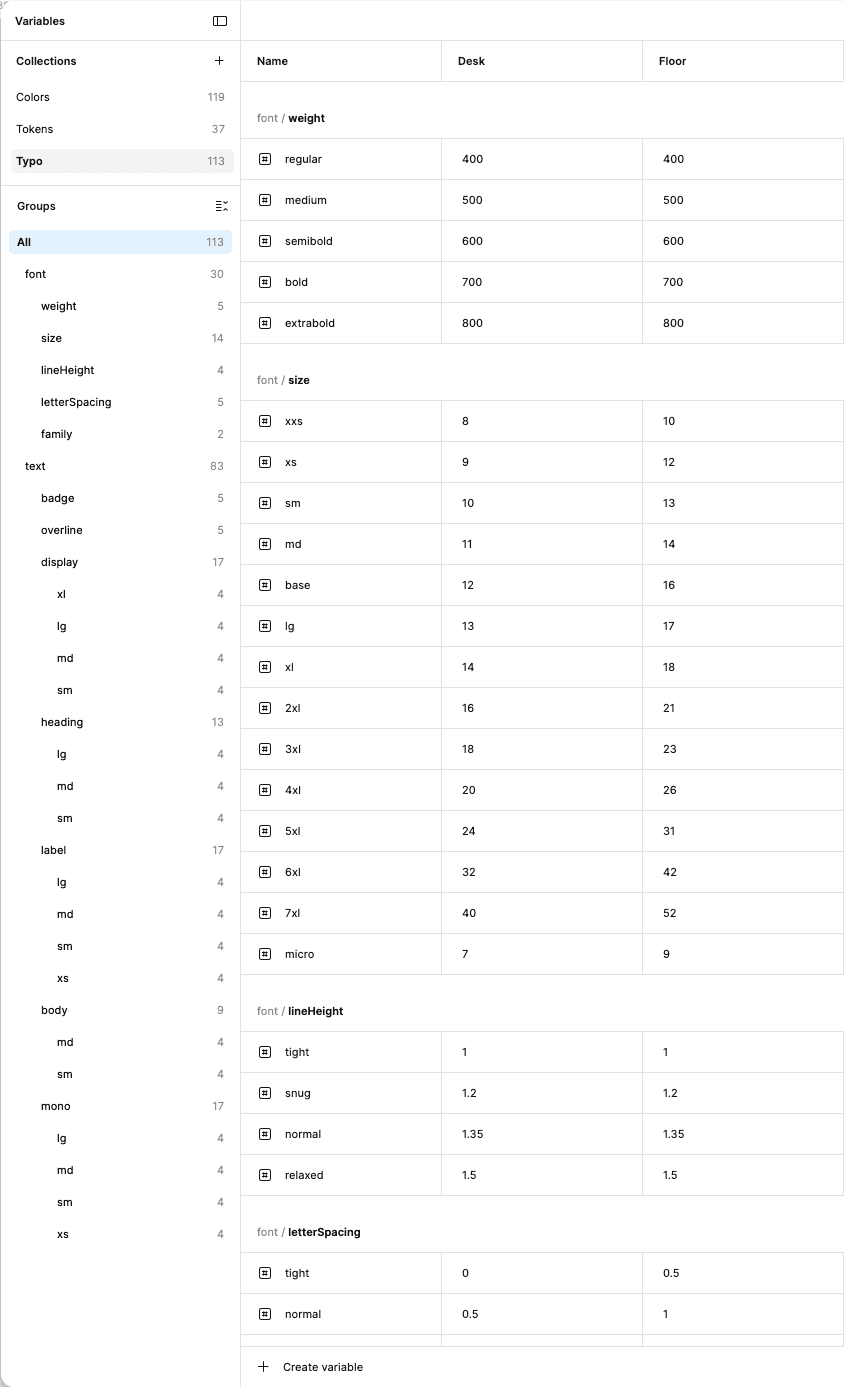
The token system is the backbone of multi-persona adaptation. Both interfaces are built from the same primitive token set spacing scales, color primitives, type scales, border radii but each persona maps to its own semantic token layer.
— The operator interface uses larger spacing tokens, larger type tokens, and fewer interactive elements per screen
— The manager interface uses compact tokens, enabling dense data panels with multiple widgets in view simultaneously
Switching between contexts is a token swap on top of shared components, not a redesign.



Key design Decision
Persona-first token architecture — Spacing, target size, information density, and choice architecture are all governed by who is reading the screen.
Slot composition over duplication — Instead of building one card per data type, the slot system allows one card architecture to host any molecule. This drastically reduces the number of components while maintaining complete visual consistency.
Alert hierarchy — Critical alerts always surface. The amber banner at the top of every screen is not dismissible and not hidden. In an industrial environment, a missed alert is a production stop, or worse.
Same layout for every page — The layout remains consistent across all pages. Only the KPIs and data modules change depending on the machine type and context. This allows operators to navigate any machine without relearning the interface (Fitts's Law: spatial consistency reduces reacquisition time).

Result
Design only — proving the architecture
The point was to prove the architecture works: one design system serving two radically different cognitive contexts through token swaps and slot composition, without duplication and without building two separate products. Design only — no implementation, no user testing, no production metrics.
— Complete design system (Atoms → Molecules → Spacers → Cards)
— Design token architecture (primitives + 2 semantic layers)
— 2 full screens across 2 personas (Operator / Manager)
— Figma Slot-based component library
Next
What’s next
This was a spec / concept project, so it won’t be continued. You can contact me for more information about Floor OS.